
Getting started
Create a project, adopt existing art, run the everyday workflow, and touch art up by hand.
PixelKiln reads a committed asset manifest and records generated files in a committed lockfile. Planning, auditing, packing, mounting, and exporting stay local. Generation and account commands connect to the selected provider.
Requirements
- Node.js 22 or newer. Node.js 24 LTS is the recommended default.
- A credential for the selected hosted provider:
PIXELLAB_API_KEYfor PixelLab,RD_API_KEYfor Retro Diffusion, or bothSCENARIO_SDK_API_KEYandSCENARIO_SDK_API_SECRETfor Scenario. Self-hosted ComfyUI needs a reachable server instead of an API key.
Install the published package in the project that owns the art:
npm install --save-dev pixelkiln
npx pixelkiln --help
The rest of this guide uses pixelkiln for readability. With a project-local
installation, prefix commands with npx or call them from an npm script.
Using an agent
Install the repository's PixelKiln skill when an agent will help operate the workflow:
npx skills add gfargo/pixelkiln@pixelkiln
The skill teaches compatible agents to plan first, preserve provenance, and
use explicit budgets. It does not grant permission to spend provider credits;
you still approve the generation command and its hard --budget ceiling. See
Agent workflows for the full safety contract and example prompts.
Start a new project
Copy the minimal manifest into the project root:
cp examples/minimal/pixelkiln.manifest.json pixelkiln.manifest.json
Set each style's generator, dimensions, prompt prefix/suffix, reference images,
and output directory. Then add one manifest entry per asset. For PixelLab, put
the credential in .env.local beside the manifest:
PIXELLAB_API_KEY=...
When a rating, pose family, framing, or provider preset is a small variation of
another style, use extends and declare a separate outDir. The child inherits
later parent fixes while keeping its own output namespace. See
style inheritance for the exact merge rules.
For experimental Retro Diffusion generation, set the manifest's
top-level provider to retrodiffusion and use:
RD_API_KEY=...
Its still, tileset-sheet, animated-GIF, and PNG-spritesheet workflows are implemented. Authenticated single-candidate RD Fast and RD Plus stills have passed from quote through validated download, provenance, and cache. Multi-candidate, tileset, GIF, and spritesheet live runs remain, so PixelLab remains the production adapter. See Manifest reference for provider options and current limits, or provider comparison for selection guidance.
For experimental Scenario still generation and reference-image edits, use both credentials:
SCENARIO_SDK_API_KEY=...
SCENARIO_SDK_API_SECRET=...
Scenario also requires a model ID and a conservative per-asset Compute Unit ceiling in the manifest. Its quote, async job, review, download, and recovery paths are mock-tested. BFL Flux 2 Dev has also passed paid single- and two-output generation, human review, and provider-backed recovery. Start with Set up Scenario, one disposable asset, and a small budget.
For self-hosted generation, set provider to comfyui, commit an API-format
workflow, and bind the inputs PixelKiln may replace. Local ComfyUI jobs use a
zero free budget, which describes the lack of a metered provider charge, not
the cost of hardware or electricity. ComfyUI is not the shortest path to
game-ready pixel art: use it only when local control justifies manual grid
recovery, palette enforcement, and art review. It can also run one controlled
pose or expression sequence as an atomic frame set. See Set up ComfyUI.
The bundled environment recipe can install the tested graph and print its
manifest style entry without making a provider call:
pixelkiln recipe install comfyui/pixel-art-xl-environment@1.0.0
To revise an existing square asset, install the separate
comfyui/pixel-art-xl-img2img recipe and declare asset.revision. Keep the
parent and child as different asset ids. PixelKiln blocks the child until the
exact parent bytes are current and, when a quality profile exists, approved.
See Controlled asset revisions.
Verify an installed recipe's workflow and the workstation's model bytes before generation. See Versioned recipes.
The provider setup guides give the shortest path for
PixelLab, Retro Diffusion, and
ComfyUI, plus the experimentally live-tested
Scenario adapter.
If one project needs several, set provider on the styles that differ from the
top-level default. One lockfile can retain all of their provenance. See
Mixed-provider projects.
Before spending anything, validate and price the selected work:
pixelkiln doctor
pixelkiln plan
pixelkiln plan --style base --only anvil,hammer
Generate with a hard cap copied from the plan:
pixelkiln gen --style base --budget 120
For a run spanning several providers, pass one named ceiling per provider:
pixelkiln gen --budget pixellab=12 --budget scenario=60 --budget comfyui=0
The command submits jobs, polls them, opens the local review sheet when a generator returns alternatives, downloads the selected images, and updates the lockfile. In review, use Left/Right to browse every candidate, Enter to select, 1–9 for direct choices, 0 to leave a row unresolved, and Up/Down to change rows. The page preserves non-square aspect ratios, fits large candidates, and keeps the review surface readable on ultrawide displays. Closing the sheet without applying discards no provider objects.
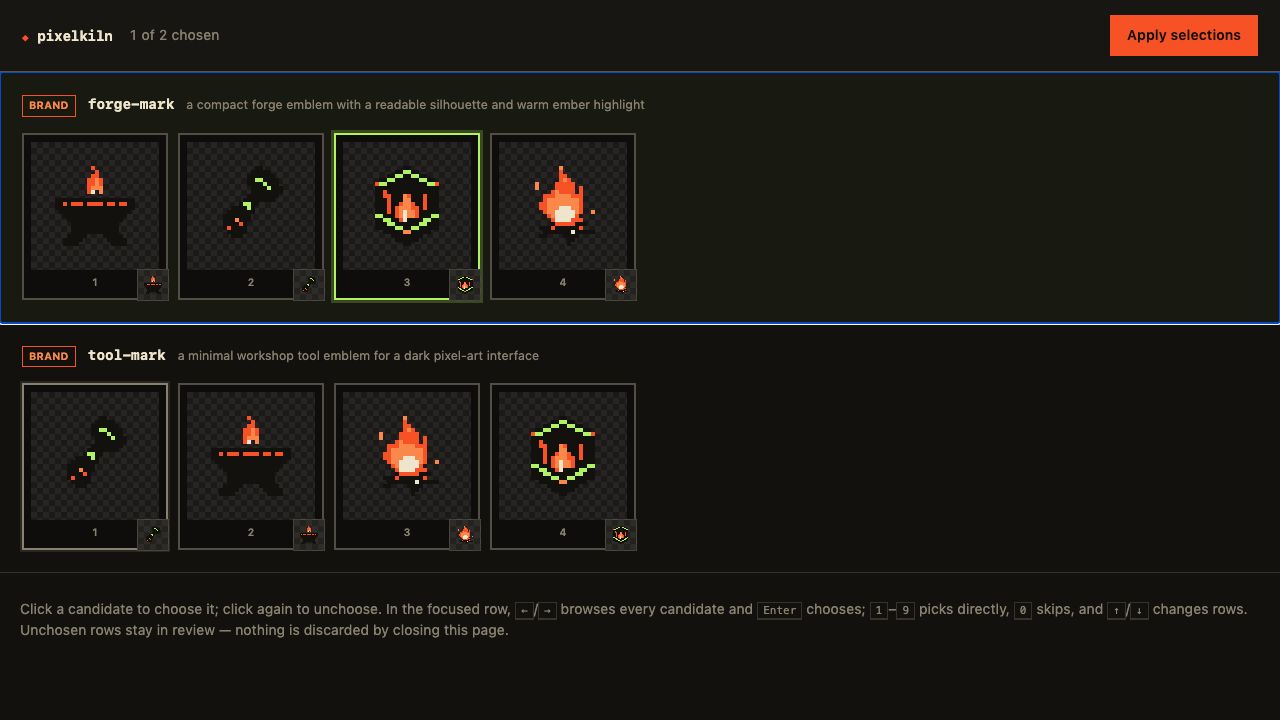
The sheet is served only on localhost and selection remains human-controlled.
Only rows submitted with Apply selections are recorded; unresolved rows can
be reopened later with pixelkiln pick.
If a run stops between stages, rerun plan. It points processing work to
poll, review work to pick, and selected or download-failed work to
fetch; these resume existing paid work without another submission.
To browse what the project has made so far, run
pixelkiln gallery. It serves a read-only page of every
generation with its full record (prompt, provider, cost, hashes, lineage, and
quality state) and can stay open while gen runs. Shift-click two records to
compare them side by side. With several registered projects,
pixelkiln gallery --workspace pixelkiln.workspace.json shows them all in one
page.
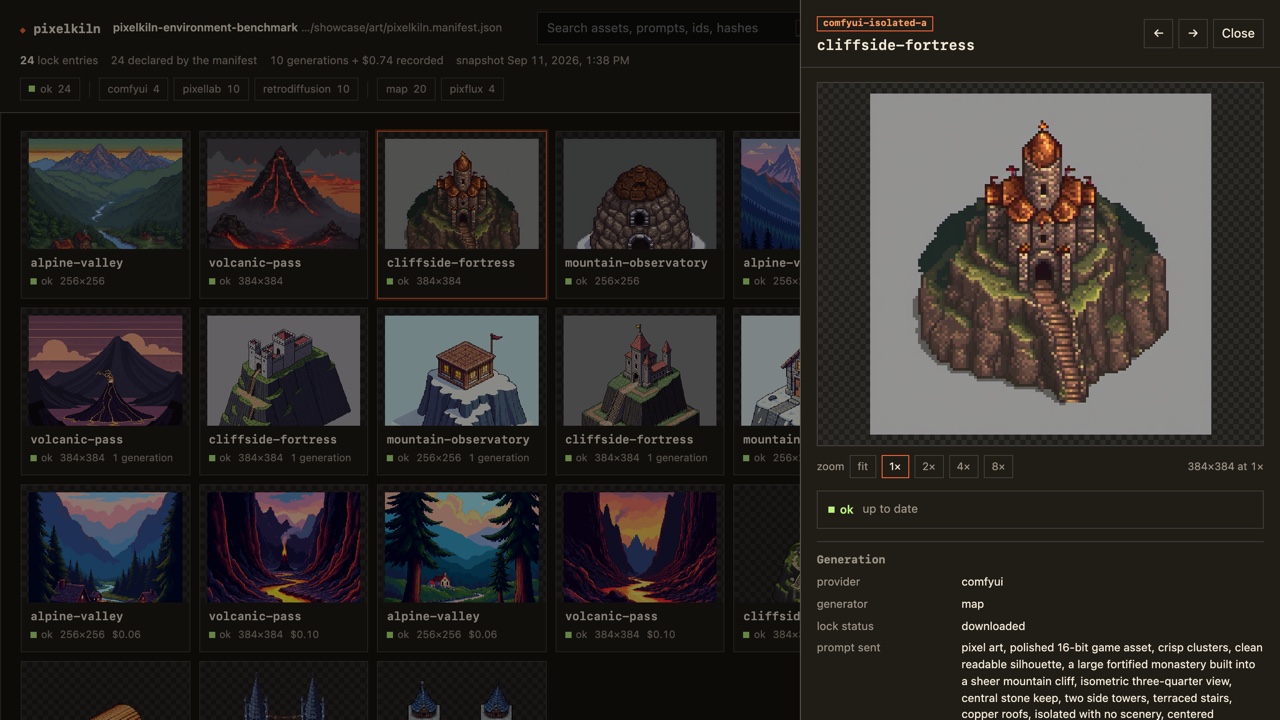
The gallery can also do work, each ability behind its own flag:
pixelkiln gallery --edit              # change prompts, sizes, tags, style fields; add assets
pixelkiln gallery --edit --budget 40  # …and generate, regenerate, and review from the page
--edit rewrites the manifest only. It is the same edit you would make in a
text editor, with the blast radius of a style-level change shown before you
save. --budget runs the same submit, poll, and fetch as gen under that
session ceiling. Without a flag the page has no write route at all.
Regenerating keeps the generation it replaces. The record's Previous
generations lists them with thumbnails, and Restore this one swaps one
back at no cost; pixelkiln history and pixelkiln restore --generation <n>
do the same from the terminal. PIXELKILN_HISTORY sets how many are kept (5
unless set) and a manifest's history overrides it per project.
Touch art up by hand
A hand edit never replaces the generated file: it is a sibling under
<outDir>/edits/ that the manifest points at with source, so plan still
reports the generation ok while pack, mount, and export place your
version. Start one from the terminal or the gallery:
pixelkiln edit --only anvil --style base            # copy, declare, open in your editor
PIXELKILN_EDITOR="open -a Aseprite" pixelkiln edit --only anvil --style base
pixelkiln tools install editor                      # optional: prefetch the in-browser editor
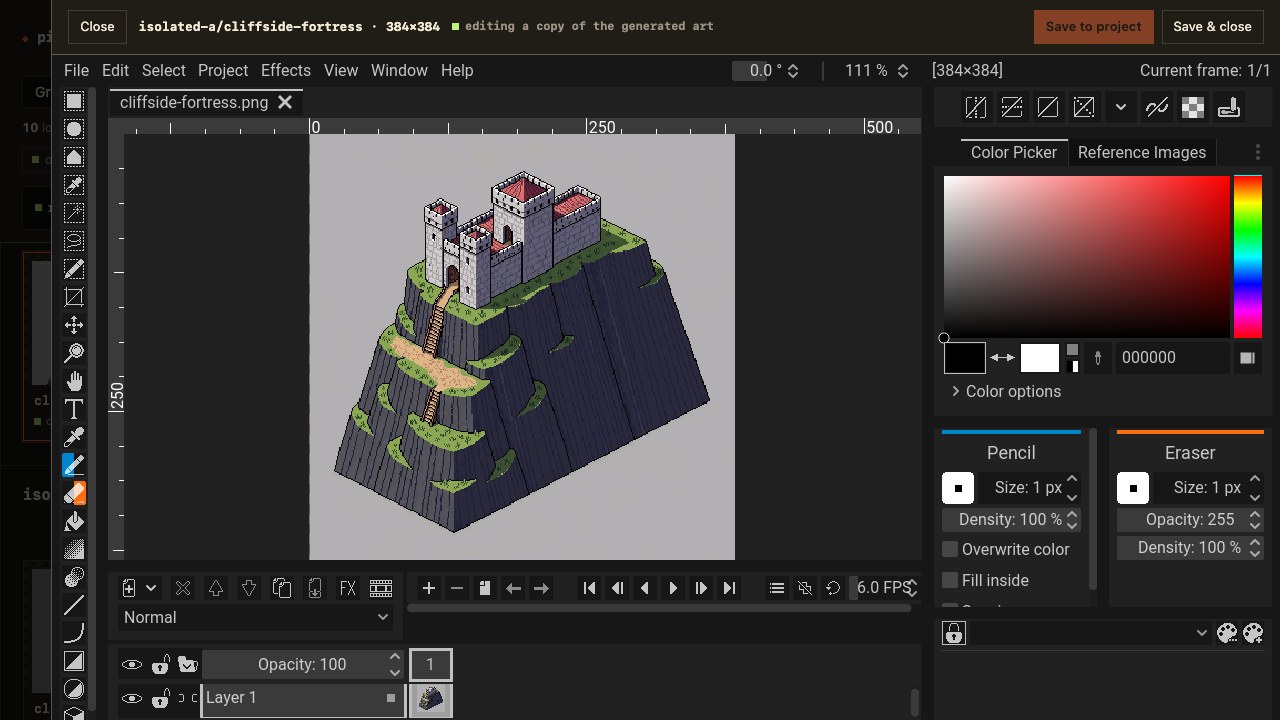
With gallery --edit, a record's Hand edit section offers the same
Edit by hand, and Edit in browser: a pinned, hash-verified
Pixelorama build the gallery serves itself, opened
in a sheet with the sprite and the style's palette loaded. Save writes the edit
back, keeps the layered .pxo beside it for the next time, and records which
generation it was based on; reopening the edit shows the generated art through
it at 50% on a locked reference layer, so what changed is always in view. A ComfyUI frame set or a PixelLab tile set opens as
one project with a frame per member and saves every member back. The 46 MB
editor is fetched once per PixelKiln release into a user cache, on the first
click or with tools install editor; see tools.
Art edited in PixelLab's own editor comes back with pixelkiln fetch --refresh
(or the record's Pull upstream changes), which replaces the local file only
if the object changed upstream and records the new bytes as that generation.
Start from existing art
Scaffold the manifest from PNGs, then reconcile exact file hashes with the provider account:
pixelkiln init --from assets/sprites --exclude characters,gifs --generator map
pixelkiln adopt --write-prompts
pixelkiln plan
init leaves prompts empty rather than inventing provenance. adopt recovers
the original prompts for exact byte matches. Locally retouched files remain
untracked; they are not silently overwritten or scheduled for paid
regeneration.
Everyday workflow
# Free: inspect drift, missing files, recovery, and estimated spend.
pixelkiln plan

# Optional safety and quality checks.
pixelkiln doctor --dry-run
pixelkiln audit --check --max-distance 35 --min-transparency 0.1
pixelkiln cache --check

# Generate only the intended slice.
pixelkiln gen --style neon --only anvil,hammer --budget 80

# When the style declares quality, build and verify its final PNGs.
pixelkiln refine --style neon
pixelkiln refine check --style neon

# Rebuild missing files from durable provider references or the local content cache.
pixelkiln restore
Manifest refinement prints one record path for each new result. Inspect that PNG
at 1× and integer zoom, then run pixelkiln refine approve --from <record> --reviewer <name> before expecting the check or packaging to pass.
Repeated --style, --only, --claims, and --output-role flags accumulate;
comma-separated values also work. Unknown flags are errors, so a misspelled
filter cannot accidentally widen a paid run.
A character and its loops
A character style holds a base drawn facing 4 or 8 directions, states (a
pose, an outfit) applied to every direction at once, and loops, one
direction each. Each is an asset with its own record and files:
{
  "styles": { "cast": { "generator": "character", "outDir": "art/cast", "size": 64, "mode": "pro-flash", "template": "custom" } },
  "assets": {
    "bot": { "prompt": "small round orange robot with one blue eye", "reference": "refs/bot-south.png" },
    "bot.walk.west": { "prompt": "walking forward in place, short legs stepping", "animation": { "of": "bot", "direction": "west", "frames": 12, "fps": 12 } },
    "bot.walk.east": { "mirror": "bot.walk.west" }
  }
}
pixelkiln plan prices it (1 generation to rotate the sprite, 1 for the
loop, 0 for the mirror) and one pixelkiln gen runs the waves: the base,
then the loop, then the flip. pixelkiln pack --style cast --format godot
writes a SpriteFrames with every direction as a still and both loops.
Regenerate the base and everything under it goes stale. See
Characters and Mirrors.
Automation
Use machine-readable planning and auditing as build gates:
pixelkiln plan --json --check
pixelkiln refine check --style neon --json
pixelkiln audit --json --check --max-distance 35 --max-colors 128
Both commands exit nonzero when the selected state is unsafe. Provider-backed pipeline stages also exit nonzero after partial failures or timeouts.
Recovery
restorerepairs missing generated outputs without buying new generations.- A deliberate regeneration replaces the old output only while its hash still
matches the lock. Use
fetch --forceonly after reviewing a changed or untracked destination that the new result should replace. .pixelkiln/cache/stores downloaded PNG bytes by SHA-256, so restoration can still work after a temporary provider URL expires. Hosted adapters keep refreshable references in the lock instead of signed storage URLs.cache --checkverifies hashes and structurally validates cached PNG/GIF media before trusting recovery bytes, then validates the account object-hash cache.cache --pruneremoves corrupt, partial, and unreferenced project content plus invalid hash entries. It does not mistake objects belonging to another project for disposable account data.adoptmaps existing local files to exact remote objects.salvage --claims <every-other-lockfile>reviews remote objects no project currently claims.salvagenever deletes;purgeis a separate confirmed operation.- PixelKiln refuses to overwrite a file whose bytes differ from its recorded
hash unless an explicit
fetch --forcetakes ownership.
What belongs in Git
Commit:
pixelkiln.manifest.jsonpixelkiln.lock.json- generated art and any derived sheets/export metadata your application uses
.pixelkiln.jsonprovenance companions written beside refined art, managed sheets, mounted trees, and tileset exports
Do not commit:
.envor.env.local.pixelkiln/caches, transaction journals, staging trees, and backupspixelkiln.cache.json
The caches are disposable performance and recovery aids. The manifest, lockfile, output files, and provenance companions are the durable project record. Lock output paths are manifest-relative, so that committed record survives moving or cloning the project instead of pointing back to an old machine's checkout. See Artifacts and provenance for the ownership and transaction model.