
3D characters from sprites
An experimental pipeline from directional sprites to a rigged, animated 3D character with separate items: a pixel path, a painted path, the steps, and what each costs.
A rigged, animated 3D character built from sprites PixelKiln generates: a bare
body and each thing it wears as separate meshes on one skeleton, in one .glb
a game engine imports.
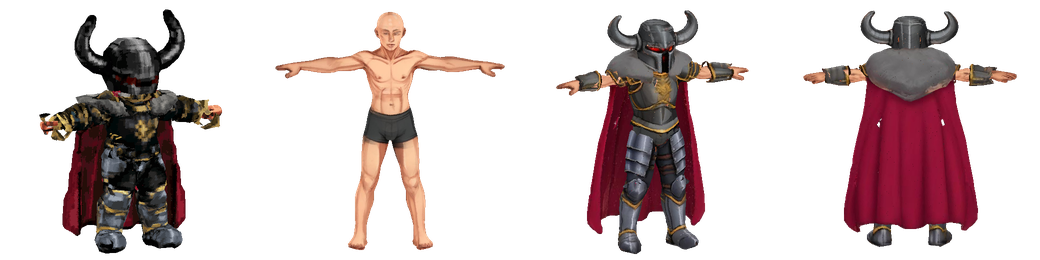
This is an experiment, not a PixelKiln command. The steps below are
scripts in research/scripts. They are rough, take
paths as arguments, and may change. PixelKiln itself is used for the first
step only: generating the sprites. The 3D characters page
has the finished models to turn and dress, and the
research note records every experiment behind this guide,
in order, with what failed.
Everything here was measured in November 2026 on one PixelLab account and one machine with a 12 GB RTX 3060.
What you get
- One file. A
.glbwith a body, its items, a skeleton and animations. - Parts, not a statue. The body and each item are separate meshes skinned to the same bones, so a game can dress the same body differently.
- Skin that hides. The body is split by what covers it. Each piece lists
the items that hide it in its node's
extras, as"hiddenBy": ["Cuirass"]. Hide a piece while any item in its list is worn, and nothing shows through. - A standard skeleton. Twenty-one bones under the names Unity's and Godot's
humanoid profiles use. Godot 4.7's
SkeletonProfileHumanoidfinds every bone it requires, by name. - Hands that close, on the painted path. Where the mesh has a thumb apart from the fingers, each hand gets a thumb, one chain for the four fingers together, and a point that marks where a grip goes. A hand drawn as a closed fist gets the grip point alone, which is enough to hold something.
- Stock animations. Motions from a humanoid library made for another skeleton, carried over bone by bone.
Choose a path
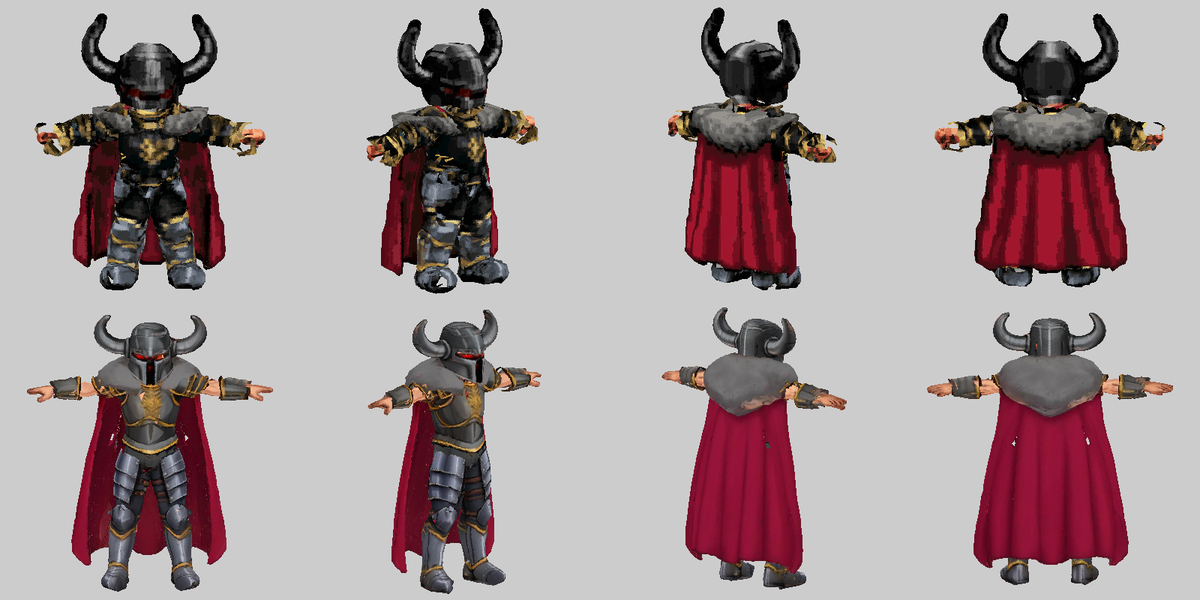
The same pipeline runs from small sprites or from large ones. Neither is the wrong one.
| Pixel path | Painted path | |
|---|---|---|
| Sprites | 64 pixels: a body, and one layer per item | 256 pixels: a body, and the body wearing each item |
| Generations | About 53: 2 for the body, 10 a layer, under 1 for joints | About 110: 9 for the body, up to 25 a worn version, under 1 for joints |
| Before meshing | The sprites, enlarged smoothly | Each sprite redrawn at 1024 pixels by an image model on your own GPU |
| GPU time, body and four items | About 45 minutes | About two hours |
| Build | About four heads tall | About seven heads tall |
| Surface | The sprite's colours, soft up close; meant to be drawn small with a pixel filter | Plates, trim, faces and cloth painted in |
| The example file | 9,300 triangles, 1.0 MB | 19,500 triangles with a sword and shield, 2.8 MB |
Take the pixel path when the game is pixel art, the camera is far, and cost matters. Its limits are known:
- It is stocky. A face needs about a dozen pixels, which at 64 pixels is a quarter of the figure's height, and the mesh keeps that build.
- Thin items can come out ragged, because a sleeve four pixels wide gives the mesh model little to go on.
- Detail stops at what 64 pixels hold. A crest is a blob of gold.
Take the painted path when the model will be seen close or large. Its limits:
- The redrawn directions do not agree on every detail. Each is redrawn alone, and the paint blends them.
- Colours can drift from the sprite's. The redraw holds them; the paint stage can still move them.
- It costs twice as much in generations and in time.
A model from either path can be drawn pixelated afterwards. The reverse is not true: detail that was never painted cannot be added by a filter.
What you need
- PixelKiln and a PixelLab account, for the sprites.
- A machine with an NVIDIA card of 12 GB or more running ComfyUI, with Hunyuan3D-2mv for meshes and Hunyuan3D's paint stage for textures. The painted path also uses an SDXL checkpoint and a tile control model. The research note's steps 8 and 17 say how they were installed.
- Python with numpy, scipy, pillow, trimesh, xatlas and fast-simplification, and Node 22, on the machine that runs the scripts.
The steps
Each step reads files and writes files. Paths in angle brackets are yours.
1. Draw the sprites
Pixel path. A bare body in eight directions with the arms out, then one
layer asset per item over those eight frames:
"body": {
  "prompt": "blank paperdoll base body: bald adult human figure, slim and lean, no clothing, standing straight with both arms held straight out to the sides"
},
"body.plate": {
  "prompt": "Dress every one in the same black steel plate cuirass with gold trim ...",
  "layer": { "of": ["body"], "columns": 4 }
}
Painted path. The same body prompt at 256 pixels, then one state per item through PixelLab's character-state tool: "wearing a black steel plate cuirass ...". A state redraws all eight directions of the same figure in the same pose. There are no separate item layers on this path; where each item is comes from comparing the worn figure with the bare one.
Arms out to the sides matters on both paths. With arms at the sides the mesh model fuses them to the body.
2. Redraw large (painted path only)
python3 research/scripts/redraw.py <sprites> <name> <redraws> "<what the character is>"
An image model redraws each sprite at 1024 pixels while a control model holds
the layout, and the sprite's colours are put back under the new detail.
OUTLINE=own keeps the outline the model drew, which is what gives a round
skull and tapered arms; the sprite's own outline is a staircase.
3. Mesh
python3 research/scripts/hunyuan3d.py <inputs> <name> <meshes>
Once for the body and once for the body wearing each item. A thin item meshed on its own collapses into slabs; meshed on the body, the body gives it shape.
4. Fit, paint and bake
TURNS=0 CAMERA=<body.camera.json> python3 research/scripts/texture.py <sprites> <name> <mesh.glb> <fitted>
TOP=45 SPREAD=22 VIEW=768 STAGE=paint python3 research/scripts/hunyuan3d_paint_turn.py <fitted.glb> <pictures> <name> <views>
python3 research/scripts/bake.py <fitted.glb> <views>/<name>.views.json <baked> <name> 2048
The fit puts every mesh in the body's frame, so items land where they are
worn. The paint stage paints one direction at a time with that direction's
picture as its reference, and TOP=45 adds views from above and below so arm
tops and shoulders are painted and not left to dark outlines.
5. Cut the items out
BODY=<body.baked.glb> python3 research/scripts/cut_item.py <worn.baked.glb> <mask.textured.glb> <item.glb>
The mask says roughly where the item is; with BODY the paint decides the
edge, so a strip of hand does not come along and a sleeve does not stop short.
6. Thin
TEX=512 python3 research/scripts/thin.py <item.glb> <item-light.glb> 3000
Reduces a part to the triangle count given, unwraps it again, and bakes its colours and a normal map from the dense mesh. The painted example went from 79,819 triangles to 16,496 with no visible loss.
7. Rig
ITEMS="Helm=<helm.glb>:Head;Cape=<cape.glb>:Hips,Spine,Chest:loose;Cuirass=<cuirass.glb>" JPEG=90 \
  python3 research/scripts/rig.py <body-light.glb> <body.rig.json> - - <character.glb>
Puts the skeleton in from joints found in the sprites (the same 18 joints the
skeletons guide covers, estimated in each
direction and combined into positions in space), moves each item to just
above the skin, gives it the bone weights of the body under it, and splits the
body by what covers it. A name after the colon limits an item to those bones;
loose marks one that hides no skin.
Hands are measured on the mesh here too. A hand with a thumb standing apart
gets seven more bones: LeftThumbMetacarpal, LeftThumbProximal,
LeftThumbDistal, LeftMiddleProximal, LeftMiddleIntermediate,
LeftMiddleDistal (the four fingers move as one, under the middle finger's
names) and LeftGrip, which carries no skin and marks where a grip goes. A
hand with no thumb to find, which is every 64 pixel hand and any hand drawn as
a fist, gets no finger bones. If it is a fist (a ball wider than the wrist
behind it), it gets its wrist moved to the narrowest place and LeftGrip or
RightGrip in the middle of the fist. The script says which it found for each
hand. FINGERS=0 turns all of this off.
8. Animate
python3 research/scripts/retarget.py <character.glb> <library.glb> <animated.glb>
Carries animations over from a humanoid library. The example uses Quaternius's Universal Animation Library, which is CC0 and is not included in this repository.
9. Swing what hangs
python3 research/scripts/sway.py <animated.glb> <out.glb>
With CHAINS="Cape=3x4" at the rig step, the cape hangs from three columns of
four bones. This simulates them through every animation and stores the swing
as keys, so the cape moves in any engine with no physics to set up.
10. Dress another body
ONLY=Head python3 research/scripts/refit.py <helm.glb> <first.skin.npz> <second.skin.npz> <helm-for-second.glb>
An item made on one body can be worn by another. Make the second body's own
mesh and rig (steps 1 to 7, the body only), write each body's bones with
SKIN=<file> at the rig step, and reshape each item from the first to the
second. Then rig the second body with the reshaped items as usual.
11. Put something in a hand
ITEMS="Sword=<sword.glb>:RightHand:held;Cuirass=<cuirass.glb>" python3 research/scripts/rig.py <body-light.glb> <body.rig.json> - - <character.glb>
A held thing is made on its own: eight directions of the object upright
(a PixelLab object, 25 generations at 128 pixels), meshed, coloured from the
sprites with texture.py, and thinned. held lays its longest line across
the palm of the hand named, puts its grip at that hand's grip point, and makes
it HELD_LENGTH of the body's height long (default 0.5). The file's own
frame does not matter. It needs a hand with a grip point: one with finger
bones, or a closed fist. In a fist the grip runs through the fist from front
to back, blade to the front, a little short of square to the forearm
(FIST_LEAN, 80 degrees), and the guard is kept clear of the fist's side.
Either hand works: name LeftHand for the left.
A shield, or anything flat carried on an arm, is strapped to a forearm:
ITEMS="Shield=<shield.glb>:LeftLowerArm:strapped;Sword=<sword.glb>:RightHand:held" python3 research/scripts/rig.py <body-light.glb> <body.rig.json> - - <character.glb>
Make it the same way as the sword, drawn upright with its face to the viewer;
unlike a held thing, its file has to keep that frame, which texture.py
gives it. Its back goes to the back of the forearm, its top towards the
elbow, so it stands upright when the arm hangs, and it is made
STRAPPED_LENGTH of the body's height tall (default 0.36). STRAPPED_TURN=90
lays it across the arm, which the shield motions need. It follows the forearm
alone and needs no hand bones.
A shield strapped across the left arm gets motions of its own:
python3 research/scripts/shield.py <animated.glb> <with-shield-motions.glb>
That adds Shield_Idle, Shield_Walk, Shield_Jog, Shield_Attack,
Shield_Block, Shield_Hold (the block held) and Shield_Bash. Each takes
the body from a stock motion and writes the shield arm: where the elbow
lies, which way the shield faces and which way its top points. Run it before
sway.py. In the stock motions the shield lies on its side on a hanging
arm, so play these in their place.
Two hands on one grip takes the two-handed kind and one more script:
HELD_LENGTH=0.8 ITEMS="Greatsword=<greatsword.glb>:RightHand:two-handed" python3 research/scripts/rig.py <body-light.glb> <body.rig.json> - - <character.glb>
python3 research/scripts/retarget.py <character.glb> <library.glb> <animated.glb>
python3 research/scripts/offhand.py <animated.glb> <two-handed.glb>
The hand named leads and sits under the guard. rig.py leaves a bone,
RightGrip2, where the other hand belongs. offhand.py then goes through
every animation: it pulls the grip in front of the body until both arms can
reach it, bends both arms to meet it, and stores the result as keys. It
prints, for each animation, how far the grip was pulled, whether the hand
ever fell short and how far a wrist bends. Run it after retarget.py and
before sway.py. An engine with its own arm solver can use the RightGrip2
bone and skip the script.
Those are one-handed motions bent to fit. For motions made for two hands, run one more script after it:
python3 research/scripts/wield.py <two-handed.glb> <with-great-motions.glb>
It adds Great_Idle, Great_Walk, Great_Jog and Great_Attack: the
sword's path is written in the script, both arms are solved to it, and the
legs and trunk come from the stock idle, walk and jog. It prints how far each
wrist bends, how far the blade is off its edge and whether a hand fell short.
To add a motion, add an entry to MOTIONS at the top of the script. An entry's
feet list moves and turns the hips and steps a foot, as the attack does.
A spear or staff has no guard and its hands go apart. Say where they go, give it to the hand that is forward, and ask for the spear motions:
HELD_LENGTH=1.1 GRIP_AT=0.45 GRIP_APART=0.2 ITEMS="Spear=<spear.glb>:LeftHand:two-handed" python3 research/scripts/rig.py <body-light.glb> <body.rig.json> - - <character.glb>
python3 research/scripts/retarget.py <character.glb> <library.glb> <animated.glb>
SET=spear python3 research/scripts/wield.py <animated.glb> <with-spear-motions.glb>
GRIP_AT is where the forward hand's middle is, as a share of the item's
length from its butt, and GRIP_APART how far behind it the other hand is.
That adds Spear_Idle, Spear_Advance, Spear_Walk, Spear_Jog and Spear_Thrust. The
idle is a side-on stance: the hips turned 45 degrees so the forward shoulder
leads, the forward foot ahead, the other behind and turned out, and the head
looking along the shaft. The walk and jog turn the hips less (28 and 14
degrees), and the thrust squares them up as the point goes out.
Spear_Advance moves forward in the stance, the forward foot stepping and
the other following without passing it; it is made in place, and the report's
groundMetresALoop says how far to move the character in one loop. The
stock one-handed motions do not suit a shaft; offhand.py can still be run
on them, but the rear hand is often off the shaft.
Then animate as in step 8. retarget.py carries the library's thumb and
middle finger over, so the hand is a fist in a walk and closed round the grip
in a sword attack. A fist has no fingers to move and holds as drawn.
In a game engine
The example file was imported into Godot 4.7.2 with no errors: one skeleton of
47 bones (21 for the body, 14 for the hands, 12 for the cape), eleven skinned meshes, twelve animations, and each body piece's
hiddenBy list in its node metadata. Godot drops a trailing _Loop from
animation names, so the library's Walk_Loop arrives as Walk.
The motions are made in place. For an engine that moves a character by its animation, run this last:
python3 research/scripts/rootmotion.py <animated.glb> <with-root-motion.glb>
It adds a Root bone under the hips and keys it forward in every walk, run and
advance, at the pace the planted foot goes back. In Godot, set the animation
player's root_motion_track to that bone. The report gives each motion's
speed and how far a foot still slides at it; the walk and the advance are
good, the jog and sprint rough. Great_Attack_Fwd and Spear_Thrust_Fwd are
the cut and the thrust ending where the step landed; they only make sense
with root motion, and SKIP=_Fwd on wield.py leaves them out. Keep the file without it for anything that
plays animations plainly, where the character would walk off and jump back.
Not tried: Unity and Unreal, Godot's retargeting onto its own humanoid rest pose, and how the model looks drawn in any engine but three.js.
Sprite cards: the other answer
A character can also be shown as its own sprites, cut into a piece per bone and carried on the skeleton as flat cards that face the camera. The pixels on screen are the drawn ones, so nothing is lost to painting. It needs no mesh texture at all, only the mesh to say which pixel belongs to which bone.
SKIN=<skin.npz> python3 research/scripts/rig.py <body.textured.glb> <body.rig.json> - - <skeleton.glb>
LAYERS="Body=<body>;Cape=<cape>:Spine:behind;Helm=<helm>:Head" python3 research/scripts/cards.py <skin.npz> <body.camera.json> <sprites> <out-prefix>
It has eight directions and no lighting, and joints open a little as limbs swing. See step 31 of the research note.
What is not done
- A command. None of this is
pixelkilnyet. - Hand-made topology. The thinned mesh has no edge loops at the joints and its unwrap is dozens of pieces.
- Materials. Colour and a normal map only: no metal or roughness, and the redraw's lighting is painted in.
- Separate fingers, eyes and a jaw in the skeleton. The four fingers move as one, and only on the painted path.
- Held items beyond swords and a shield. A shield gripped in the fist is untried, the grip is not sized to the hand, there are four motions made for two hands and the rest are stock one-handed ones bent to fit, which can bend a wrist too far, and there are no left-handed sword motions. The shield's straps are paint: the hand does not hold one. A fist cannot open, so it cannot let go or change its hold.
- Many bodies. The items have been worn by two: the one they were cut on
and one much heavier man, after
refit.pyreshaped them for him. Other heights and builds are untried.