
Paperdoll layers
How it works
Games that ship swappable gear on pixel sprites (Ultima Online, Diablo II, Flare) all work the same way: the body is a full set of frames, every item is a full set of frames for the same poses, and the game draws body frame N and then each item's frame N. The hard part is making frame N of the item match frame N of the body.
Asking a model for "the same character in armour" does not do it. The model redraws the body, a pixel here and a shade there, and the difference between the two images is no longer just the armour.
A layer avoids the problem by painting the item onto the body's own frames:
- Clean. Loop frames are stripped of the ghost pixels an animation model leaves around a figure. See Cleaning loops.
- Sheet. Every frame of every source asset is centred on a common canvas, cut to the one box that holds them all, and laid on a single sheet.
- Mask. White where the provider may paint, black where it may not.
- Key. Inside the mask, skin is repainted cyan, keeping its shading. Outside it the frame keeps its own colours.
- Inpaint. One masked inpaint over the whole sheet.
- Cut. Pixels the provider repainted, that are not still cyan, are the layer. It is split back into one PNG per source frame.
| What the provider is sent | The mask | What it returns |
|---|---|---|
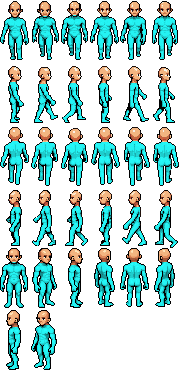 | 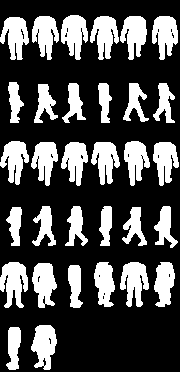 | 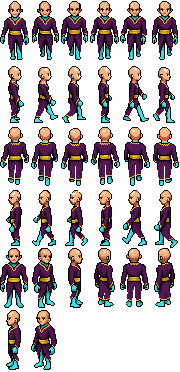 |
Three choices carry the result:
- One sheet, one request. The model sees every pose at once, so the outfit is the same in all of them. Two requests with the same prompt give two different outfits.
- A masked inpaint. PixelLab's
/inpaint-v3returns every pixel outside the mask exactly as it was sent. In the four live runs that counted, zero pixels outside the mask changed. Part of every figure is always outside the mask (the head for an outfit, the body for a hat), and a model cannot move a figure it may not touch, so the poses hold. - Cyan skin. Asked to keep the skin, a model returns skin tones that overlap leather, hair and wood, and the body can no longer be told from the outfit. Cyan comes back as shades of cyan, and dropping it is a hue test. Only the part the provider may repaint is keyed. The rest comes back identical whatever colour it went in as, and in its own colours it tells the provider things cyan does not: under an outfit's mask it is the head, and a head with a face on it is a figure seen from the front.